

Docs · General
How Band Social works
One platform, two modules. Start here for the big picture — then dive into the module you're setting up.
Overview
Band Social is a management platform for working bands, built as one product with two subscribable modules that share a single login, a single band switcher and one set of band data:
- Social — publish and schedule to Facebook, Instagram, TikTok and YouTube, plan your content on a calendar, and run a public band page with a downloadable press kit (EPK) and page analytics.
- Booking — a booking & promotion CRM: directories of venues, labels and press, template-based outreach email, concerts on a calendar and map, expenses with splits, and a per-show profit-and-loss report.
A band subscribes to a tier — Social, Booking, or Pro (both) — and access to each module is granted per band. One account can run several bands; the band switcher at the top of the sidebar moves between them, and each band carries its own plan, connected accounts and data. Everything is priced in EUR and billed per band.
Getting started
- Create your account. Go to /signup and enter your name, email and a password (at least 10 characters), or choose Continue with Google. There are no other sign-in methods.
- Add your first band. A short two-step wizard: first the band name (required) and an optional description, then a plan. The name also decides your public web address — see Your public web address.
- Start your free trial. Every plan begins with a 14-day free trial — no credit card required. Choosing a tier grants its module(s) immediately.
- Land on your module. After the wizard you go straight to where the work starts: a Social plan drops you on Accounts to connect a platform; a Booking plan drops you on Booking Home to start adding venues and press.
You'll get a short welcome email when your first band is created. During band creation you can also connect your Spotify artist (search and select) so your discography and follower stats are ready to go.
If you signed up with an email and password, you also get a confirmation link — open it within 24 hours to confirm the address. You can carry on without it, but publishing, AI drafts and outreach email stay off until you confirm; see Signing in, passwords & email confirmation. Continuing with Google confirms the address for you.
Need another band later? Open the band switcher and choose Add band. Each band is a separate world — its own plan, its own connected accounts, its own booking data.
Your public web address
Your band name becomes the address of your public page and press kit: The Verve gets band.social/the-verve. It is settled once, when the band is created, and renaming the band later does not move it — so a link already printed on a poster keeps working.
If another band got there first, we try the readable variants before anything else — the-verve, then theverve, then the-verve-band, then theverveband. Only when all four are gone does the wizard ask you to finish the address yourself: a city, a year, anything that tells you apart (/the-verve-uk). It says which addresses are taken, checks what you type while you type it, and confirms the address is yours before you move on to the plan step — so nothing fails after you have chosen a plan. You are never handed a random string of characters.
Plans, trials & billing
Three plans, each billed per band:
| Plan | Price | What you get |
|---|---|---|
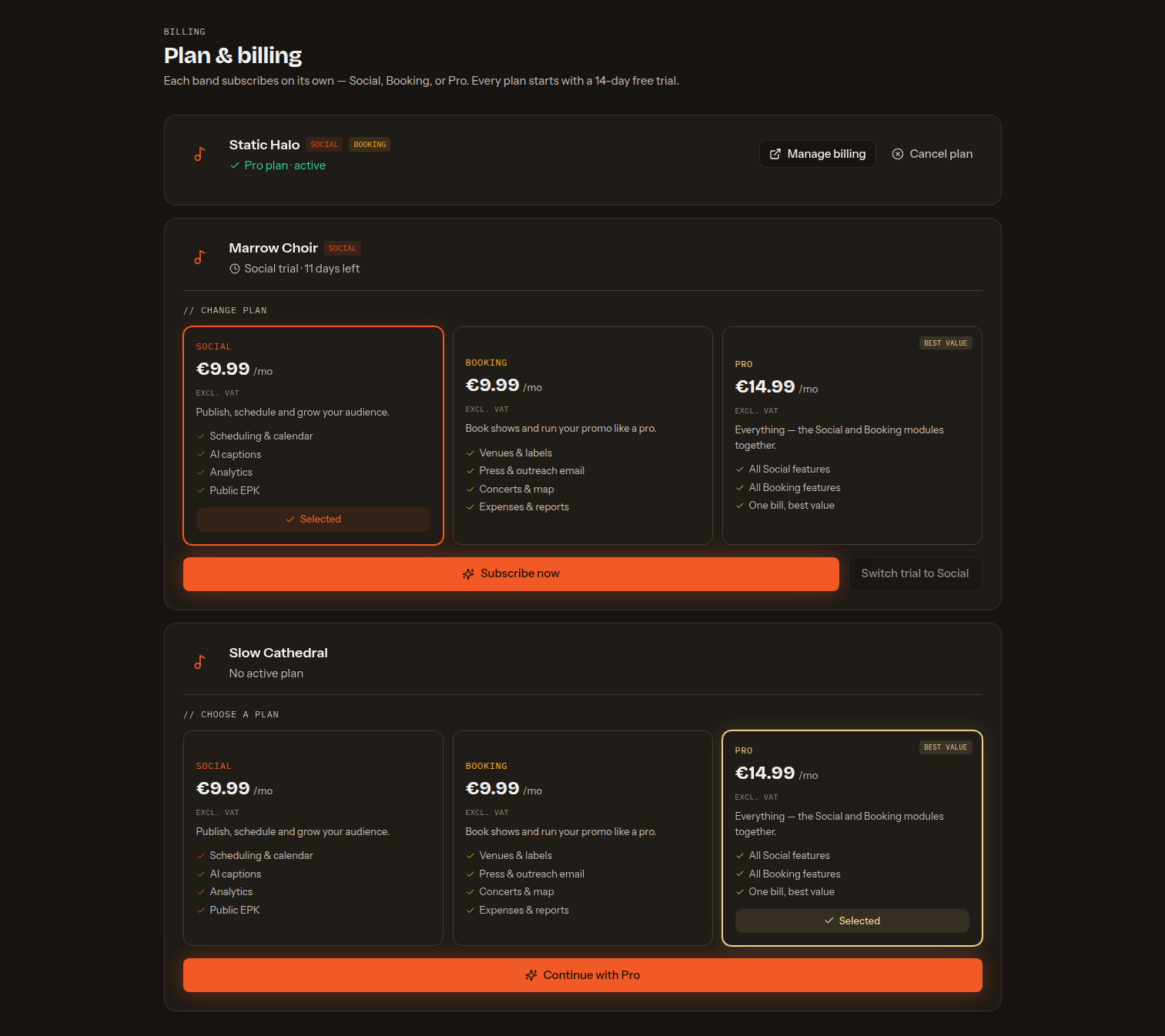
| Social | €9.99/mo | For bands focused on promotion, content planning and their online presence. |
| Booking | €9.99/mo | For bands organizing contacts, outreach, shows and tour finances. |
| Pro | €14.99/mo | For bands that want promotion and booking in one connected workspace. |
Those prices are excluding VAT — what a subscription actually costs depends on the country and VAT number you enter at checkout. See Prices, VAT & invoices.
The 14-day trial is app-managed
Picking a tier grants its modules right away for 14 days, with no card and no Stripe checkout. You can build out your band, connect accounts and send outreach during the trial. When it ends you subscribe through Stripe to keep the module; if you don't, the module is simply hidden.
Nothing is deleted on lapse
If a trial ends or you downgrade, the module and all of its data are hidden in the app but retained in full — and everything returns the moment you re-subscribe. A locked module shows an Unlock prompt in the sidebar instead of its pages.
Managing your subscription
Billing is per band. Open Plan & Billing to see every band and its status — trial days remaining, active, or past due. A band on a trial can Subscribe now (Stripe checkout) or switch its trial to a different tier; a paid band gets Manage billing, which opens the Stripe customer portal to update the card, view invoices or cancel. To add the other module, upgrade to Pro — your existing data is untouched. All prices are in EUR.
Prices, VAT & invoices
Every price we publish — €9.99, €14.99 — is the amount before VAT. Tax is worked out at checkout rather than assumed, so what you pay depends on the details you enter there:
- A billing address is required, because the country is what decides the rate. At Portuguese VAT, for example, a €9.99 module is charged €12.29.
- A VAT number is optional, and it is what makes a sale a business sale. Stripe validates what you type against the EU's VIES register. A valid number from another EU country means reverse charge — 0% VAT, and the invoice says Customer to account for VAT. No number, or one that can't be validated, means the sale is taxed as a consumer sale.
- Domestic sales are taxed either way, VAT number or not.
- You are never asked “are you a business?” — the VAT number answers that on its own.
The name, address and VAT number you enter are saved to your billing account, so every renewal invoice carries them instead of going out blank. If you mistype the VAT number, fix it in Manage billing — the Stripe customer portal, which is also where every invoice, past and current, can be downloaded. An invoice is issued with whatever is stored at the time, so correcting it there is what keeps the next one right.
Band profile
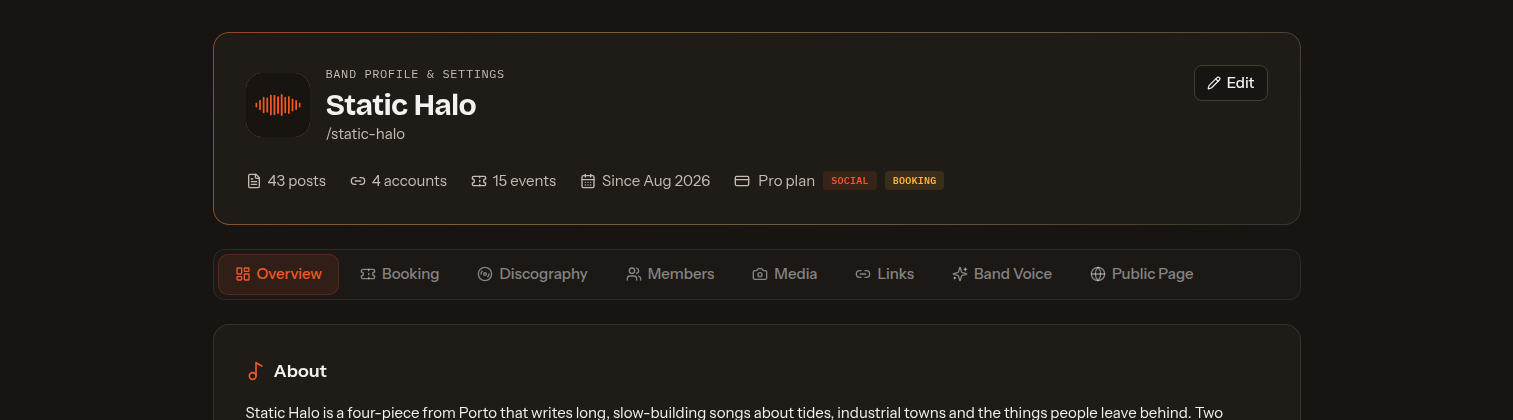
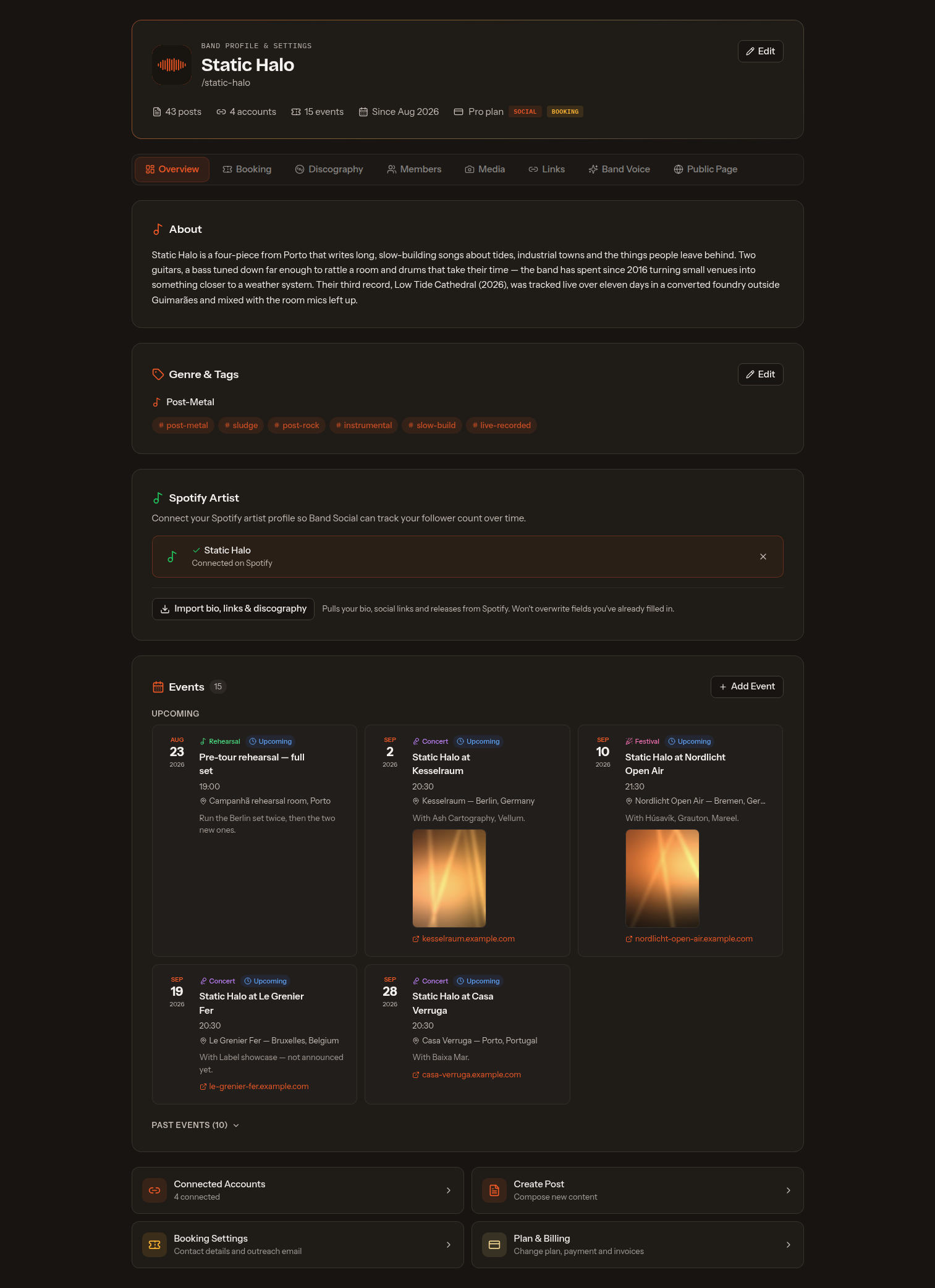
The Band Profile is your band's content hub. It feeds two things at once: your public page and EPK, and the merge variables used in Booking outreach emails — so it's worth filling in even on a Booking-only plan. It is also where every per-band setting lives: there is no separate “Band Settings” page. Open it from Band Profile at the top of the sidebar, under Home. It's organised into tabs — the shared ones first, then one per module, which unlock with the band's plan:
- Overview — logo, band name, your
/slug, description/bio, genre & tags, upcoming events, quick stats (posts, accounts, events), and your connected Spotify artist — search for your artist profile and link it here (or at band creation) to power discography, bio & links import, and follower and monthly-listener tracking. - Discography — releases with a title, type (Album, EP, Single, Live, Compilation, Demo), release date, description, a tracklist, streaming links and artwork. With a Spotify artist connected, use Import from Spotify to pull your artist profile in one step — not just your discography (cover art, release date, type and Spotify link, with releases already in your list flagged and skipped) but also your bio and links. It never overwrites details you've already filled in.
- Members — each member has a name, instrument/role, photo, bio and their own optional Instagram and Facebook links (an @handle or a pasted profile link; they show on the member's card on your public page when filled in), and can be reordered. Adding an email is optional and only needed to give that person login access, in which case you set a permission level (Member or Admin).
- Media — photo albums and gallery images that appear on your public page.
- Links — your streaming, social, website, merch and email links (Spotify, Apple Music, Bandcamp, YouTube, YouTube Music, SoundCloud, Deezer, Tidal, and more). These are the single source for the buttons on your public page and for the link merge variables in emails.
- Band Voice — a short free-text field (up to 1000 characters) to capture your band's tone and personality, with a few example presets to start from. It's saved to your profile as a reference for how you write about the band.
- Public Page — enable or disable your public page, copy or open its URL, and open the page builder (covered under the Social module).
- Booking — your booking contact & profile (contact person, band email, city/country, formation year, number of members, style description — these feed the outreach merge variables) and your outreach email provider: the platform sender or your own SMTP server.
A tab for a module the band isn't on stays visible with a padlock and links to billing. Your plan, trial countdown and module badges are shown in the profile header, next to a shortcut to Plan & Billing.
Note: events (shows) can be added here on the Overview tab or from Booking's Concerts — they are the same underlying records, so a show added in one place appears in the other.
Account & band settings
There are two settings scopes.
Account settings
Your personal login, from the account menu at the bottom of the sidebar. You can edit your name, see your email and role, set your timezone (used so scheduled post times show correctly), and change your password.
Under Numbers & currency you choose how amounts are printed everywhere in the app — fees, expenses, tour money and reports. Pick the currency symbol (default €), the thousands separator (default a dot) and the decimal separator (default a comma), so €1.234,56 can become $1,234.56 instead. It is a display setting only: your subscription is still billed in euro.
Under API keys you create the keys that let an AI assistant work with your bands. Setup, what an assistant can read and change, and what it can never do are on the AI assistants page.
Under Notifications, the Toast messages switch turns off the small pop-ups that confirm saves, uploads and errors. It hides every toast, error messages included, and applies to the browser you set it in — flip it on again from the same page.
Band settings
Per-band settings are not a separate page: they live on the Band Profile, one tab per area. Identity (name, genre, description, /slug) is on Overview, bandmates and their roles on Members, your booking contact and outreach email provider on Booking, and your plan, trial countdown and module badges in the profile header (with a shortcut to Plan & Billing).
Signing in, passwords & email confirmation
You sign in with an email and password or with Continue with Google — there are no other methods, and the two are separate: an account created with Google has no password to reset.
If you forget your password, use Forgot password? on the login page. The link you get opens a Choose a new password form; it lasts one hour and works once, so if you ask twice, use the newest email. The page gives the same answer whatever you type — it won't tell a stranger whether an address has an account here — and an address that signed up with Google gets an email saying so rather than a reset link. Finishing a reset also confirms your email address and clears a locked-out login.
What makes an acceptable password is length, not symbol soup: at least 10 characters, up to 72, and no rule about capitals or punctuation. A few shapes are refused because they are what gets guessed first — a common word with digits stapled on, a keyboard run, a bare number, your own name. The rule applies to a password being set, never to one being checked at login, so an older short password keeps working. Changing your password signs your other devices out and sends you a heads-up email — which is how you would notice a change you did not make.
Too many wrong passwords locks that account's sign-in for a few minutes. Only failed attempts count and a success clears them, so mistyping twice and getting it right never locks you out. Reset emails are capped the same way — three per address an hour.
Confirming your email is asked for once. Until you do, a strip sits at the top of the app with a Resend link button, and three things are switched off: publishing to a network, AI generation (captions, the Content Pack and Booking's pitch drafting), and sending outreach email. Everything else is open — bands, drafts, scheduling, your public page, venues, contacts and concerts, and the trial itself.
A scheduled post never fails for this. If its time arrives while you are unconfirmed it stays Scheduled and goes out on the next run after you confirm — nothing to reschedule. The confirmation link lasts 24 hours; if it expires, the banner sends a fresh one.
Your data: take a copy, or close the account
Both live under Your data at the bottom of Account settings.
Export my data downloads a single band-social-export.json: your account, every band you belong to, and what is in them — posts, campaigns, discography, concerts, subscribers, and Booking contacts, outreach history and expenses where the band has them. Booking records are included even if that module has lapsed. Your API keys are listed by name, access and dates, never the keys themselves. Passwords and social-network tokens are never in the file, and the file lists what was withheld rather than leaving you to guess.
Delete my account first shows what would happen, band by band. Bands you are alone in are deleted with the account and their paid subscription cancelled. Bands with other people carry on without you — you are removed from the line-up, though posts you wrote there and networks you connected go with your account, and the screen names those counts. A band you own that has anyone else in it (an unaccepted invite counts) blocks the deletion until you transfer ownership from its Members tab, as does a surviving band still billed to your card: closing your account never deletes a workspace other people work in.
When nothing is blocking, confirm by typing your email address, plus your password if the account has one (a Google-only account does not). It cannot be undone. Stripe keeps past invoices as financial records, but nothing is charged again.
Transferring ownership is on the band's Members tab and only the owner sees it: it makes another member (one who has signed in at least once) the owner and makes you an admin. A band has exactly one owner, so it is a hand-over — they can hand it back.
Deleting a band
At the bottom of the band profile's Overview tab, and only if you own the band. You type the band's name to confirm, because this ends the workspace: every post — drafts, scheduled and published — with its uploads, publish results and analytics; the band's connected networks, contacts, concerts, tours, expenses, templates and sent email; its public page, press kit and uploaded files; and the subscription, which is cancelled.
If other people work in the band you are told how many will lose access before you confirm. If you only want to leave, transfer ownership on the Members tab and remove yourself instead.
Two things to be precise about. Deleting a band removes Band Social's copy of a network connection, not the permission you gave that network — withdraw the app's access in Facebook, Instagram, TikTok or YouTube's own settings. And posts already published stay live there, the same as when you delete a single post: deleting the band deletes what is here.
Frequently asked questions
- Do I need a credit card to start?
- No. Pick a plan and you get a 14-day free trial with full access — no card required. You only add payment details if you decide to keep the module after the trial.
- What's the difference between the plans?
- Social gives you multi-platform publishing, the scheduling calendar, your public page + builder, the downloadable EPK and page analytics. Booking gives you the venue/label/press CRM, template outreach email, concerts and venues on a map, expenses with splits and the booking P&L report. Pro unlocks both modules for one price.
- Can I add the other module later?
- Yes. Start on one module and upgrade to Pro whenever you want the other — your data is always kept, and switching is done in Plan & Billing.
- I manage more than one band. How does billing work?
- One account manages every band, and billing is per band — each band carries its own plan, so you only pay for the modules it actually uses.
- Is VAT included in the price?
- No — the prices shown are before VAT. Tax is calculated at checkout from the billing address you enter, and entering a valid EU VAT number from another member state means reverse charge (0% VAT). See Prices, VAT & invoices.
- Can I import my existing venues, labels or press contacts?
- Yes. Every Booking directory supports CSV import — download the column template, drop in your spreadsheet, and it maps the fields. You can export any list back out too.
- Can I send outreach from my own email address?
- Yes. Use the built-in platform sender with no setup, or connect your own SMTP server so emails come from your address. Either way every send is logged with its exact content and status.
- What happens to my data if a trial ends or I cancel?
- Nothing is deleted. The module is simply hidden; re-subscribe and everything — venues, concerts, posts, reports — comes straight back.
- Can Band Social see the posts we published before signing up?
- Yes. Connect an account and the last 90 days of that platform's posts are imported — re-sync or import again any time from the Accounts page. They appear on your content calendar as read-only history and they teach the AI how your band actually writes. Nothing is posted or changed on the platform.
- I forgot my password. What now?
- Use Forgot password? on the login page. The link lasts an hour and works once; if you signed up with Google there is no password to reset, and the email tells you so.
- Why can't I publish or use AI yet?
- Your email address is not confirmed. Open the link sent at signup, or press Resend link on the strip at the top of the app. Publishing, AI drafts and outreach email are the only things that wait for it, and a post scheduled in the meantime still goes out once you confirm.
- Can I get a copy of everything, or close my account?
- Yes, both from Your data in Account settings — one JSON export of your account and bands, and a self-service deletion that shows exactly what goes before you confirm. A band other people work in is never deleted with your account; you transfer ownership first.
- Use Cookie settings in the site footer, or section 8 of the Privacy Policy. It reopens the consent banner, tells you what you currently allow, and lets you accept or withdraw. Analytics is the only thing to decide — Band Social runs no advertising — and nothing non-essential is stored until you accept.
- Can we change our public web address?
- Not from inside the app. The address is settled when the band is created and stays put when you rename the band, so links you have already handed out keep working — write to support@band.social if it genuinely has to move. See Your public web address.
- Can the public page replace our website?
- For most working bands, yes. Music embeds, shows, photos, a contact form and a downloadable press kit — everything a promoter or fan looks for, at one short link.
Ready to set up your band?
Start free — no credit card required.
Start free